Major password managers can leak logins in clickjacking attacks
Six major password managers with tens of millions of users are currently vulnerable to unpatched clickjacking flaws that could allow attackers to steal account credentials, 2FA codes, and credit card details.
Threat actors could exploit the security issues when victims visit a malicious page or websites vulnerable to cross-site scripting (XSS) or cache poisoning, where attackers overlay invisible HTML elements over the password manager interface.
While users believe they are interacting with harmless clickable elements, they trigger autofill actions that leak sensitive information.
The flaws were presented during the recent DEF CON 33 hacker conference by independent researcher Marek Tóth. Researchers at cybersecurity company Socket later verified the findings and helped inform impacted vendors and coordinate public disclosure.
The researcher tested his attack on certain versions of 1Password, Bitwarden, Enpass, iCloud Passwords, LastPass, and LogMeOnce, and found that all their browser-based variants could leak sensitive info under certain scenarios.
Exploitation methods
The main attack mechanic is to run a script on a malicious or compromised website that uses opacity settings, overlays, or pointer-event tricks to hide the autofill dropdown menu of a browser-based password manager.
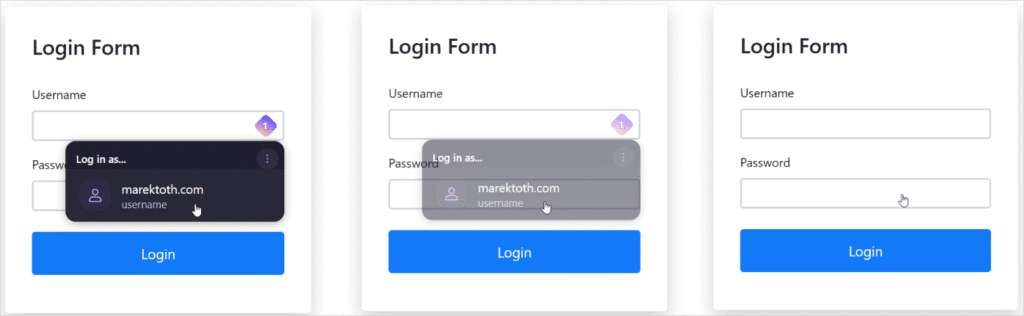
The attacker then overlays fake intrusive elements (e.g. cookie banners, popups, or CAPTCHA) so that the user’s clicks fall on the hidden password manager controls, resulting in completing the forms with sensitive information.
Tóth demonstrated multiple DOM-based subtypes that constitute exploitation variants of the same flaw, including direct DOM element opacity manipulation, root element opacity manipulation, parent element opacity manipulation, and partial or full overlaying.
The researcher also demonstrated the possibility of using a method where the UI follows the mouse cursor, so any user click, no matter where it’s positioned, triggers data autofill.

Tóth says that a universal attack script can be used to identify the password manager active on the target’s browser and then adapt the attack in real-time.
Vendor impact and responses
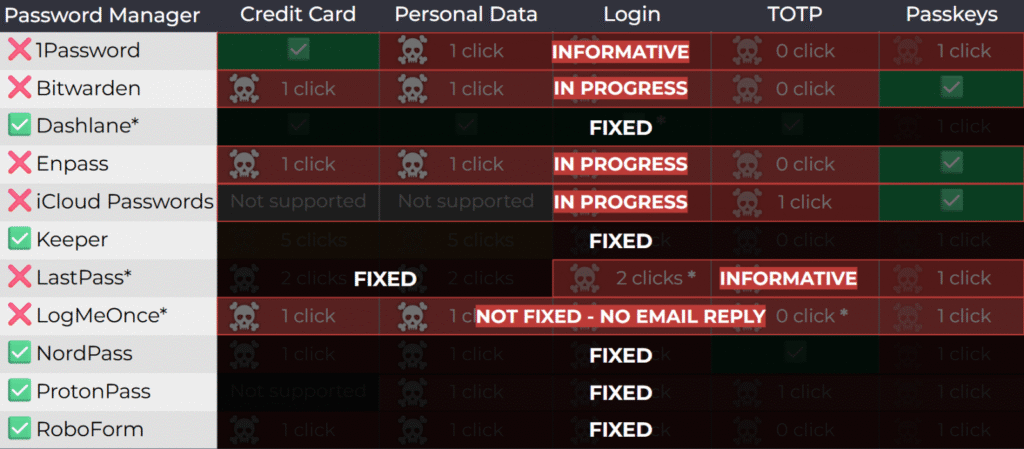
The researcher tested 11 password managers chosen for their popularity and found that all of them were vulnerable to at least one attack method.

The researcher notified all vendors notified of the issues in April 2025. The researcher also alerted them that public disclosure would follow in August at DEF CON 33.
Socket performed another round of contacts this week to notify them that theyr are filing CVEs for their respective products.
1Password rejected the report, categorizing it as “out-of-scope/informative,” arguing that clickjacking is a general web risk users should mitigate.
Similarly, LastPass marked the report as “informative,” while Bitwarden acknowledged the issues but downplayed the severity. However, Bitwarden told GeekFeed that the issues have been fixed in version 2025.8.0, rolling out this week.
It is unclear if LastPass and 1Password are planning to address the problem.
LogMeOnce did not respond to any communication attempts, either by Tóth or Socket.
Currently, the following password managers, which together have around 40 million users, are vulnerable to Tóth’s attack methods
- 1Password 8.11.4.27
- Bitwarden 2025.7.0
- Enpass 6.11.6 (partial fix implemented in 6.11.4.2)
- iCloud Passwords 3.1.25
- LastPass 4.146.3
- LogMeOnce 7.12.4
The vendors that implemented fixes are Dashlane (v6.2531.1 released on August 1), NordPass, ProtonPass, RoboForm, and Keeper (v17.2.0 released in July). However, users should make sure that they’re running the latest available versions of the products.
Until fixes become available, Tóth recommends that users disable the autofill function in their password managers and only use copy/paste.
GeekFeed has contacted all vendors who haven’t pushed fixes onto their products yet, and we will update this post with their responses once they reach us.
[Update 8/20 3:20 PM EST] – LastPass and LogMeOnce reached out to GeekFeed following the publication of this article to explain that they too are working on resolving the issues raised in Tóth’s report.
[Update 8/20 3:40 PM EST] – Edited the vendor notification timeline for better accuracy, based on new information received from Socket.
[Update 8/20 4:15 PM EST] – LastPass sent GeekFeed the following statement:
“We appreciate the work of security researchers, like Marek Tóth, who help raise awareness about potential threats and improve industry-wide security. The clickjacking vulnerability Marek uncovered highlights a broader challenge facing all password managers: striking the right balance between user experience and convenience, while also addressing evolving threat models.
LastPass has implemented certain clickjacking safeguards, including a pop-up notification that appears before auto-filling credit cards and personal details on all sites, and we’re committed to exploring ways to further protect users while continuing to preserve the experience our customers expect.
In the meantime, our threat intelligence, mitigation and escalation (TIME) team encourages all users of password managers to remain vigilant, avoid interacting with suspicious overlays or pop-ups, and keep their LastPass extensions up to date.” – Alex Cox, Director Threat Intelligence, Mitigation, Escalation (TIME) at LastPass.
[Update 8/21 3:40 AM EST] – 1Passwoed sent GeekFeed the following comment:
“Clickjacking is not unique to the 1Password browser extension. It is a long-standing web attack technique that affects websites and browser extensions broadly. Because the underlying issue lies in the way browsers render webpages, we believe there’s no comprehensive technical fix that browser extensions can deliver on their own.
We take this and all security concerns seriously, and our approach to this particular risk is to focus on giving customers more control. 1Password already requires confirmation before autofilling payment information, and in our next release, we’re extending that protection so users can choose to enable confirmation alerts for other types of data. This helps users stay informed when autofill is happening and in control of their data.” – Jacob DePriest, CISO at 1Password